this is my Evaluation for this unit 67: 3D Animation
This is the unit based on 3D Animations, it focuses on the theory as well as the production of an animation. Our animation for this unit also had to include inspiration and research about DADA Art, and we had to show this in out animation.
I like to think that i understand how to use the 3D Modeling and Animation software Blender well and i think that I know most of the terminology needed throughout this unit.
I think that i have done nwell through this unit wlthough i thin that i should of spent some more time on the animation to create better flowing animations.
If i were to do this unit again i would probably take more time to create more detailed models and to create more intricate animations.
The reason for checks like the Legal and Ethical is to ensure that games follow these guidelines which allows for games to be published an sold.
The legal side of this is to ensure that things are created legally and if not they could be court cases against the accused. Content used in games/Animations have to be created by ones self or if using an others work get consent from the owner.
The Ethical side of this is to ensure that the morals for the creation of something are good and not offensive or insensitive. If a game were to be created which is deemed to be too offensive or too insensitive it could be barred from being published unless changes are made.
In order to create my animation i have created lots of plans including word documents an Photoshop documents of ships that are going to be the base of my animation.
After creating plans i decided to create a space animation with lots of ships ad planets, ending with a spaceship fight which results in one being destroyed and debris scattered around.
3D Viewport:
This is the normal view of blender, the default mode is object mode where the move the objects around the 3D Area. This is used to see the models without the various edit features such as the Verts, Edges and Faces.
Edit Mode:
Edit mode is te mode where you can edit the 3d models, this stretch from basic box modeling where you start with a basic object and use the extrude and scale functions to create more complex models. In this mode you can see the Verts, Edges and faces of which you can then edit.
Materials:
Materials are things that you create in blender that you then apply to models to give them color and a texture, these can be created using the told i blender although they can imported from other sources.
Keyframes:
Keyframes are using in animations to track where objects are on a timeline, the object will move between a key frame to the next. Keyframes have to be applies to everything that is moving in the frame for this to work.
Another thing that helps the Keyframing process is the Dope Sheet, this tracks all of the keyframes of the animation and it allows you to edit each one and it also allows you to copy and pase animation frames so you don' have to put the model back exactly.
Bones:
Bones are used on models tat have to move intrecaely sch as human models, the bones act lik reacl bones, they connects the body together so you can make the body moves more human like.
Blender Experiment:
I created a robot head to experiment with keyframes and colours, i did this to get a greater understanding of changer colours in an animation
I created the first 2 initial frames that changed the colour of the robots eyes from red to blue, then i used the Dope Sheet to then duplicate the frames to loop the animation longer.
Final Ship:
Ship Wing: This is the basic ship model i will be following, this is just a template to base my models after as i will be doing each part separately.
This is the start of the wing on the ship, i will be using the mirror to keep the whole ship symmetrical like a real aircraft.
Learning from my previous creations using blender i had learned enough to create a basic 3D puppet based on the puppets created by Sophie Taeuber-Arp during the DADA art movement. The plan for this creation was to create a puppet inspired by hers and animate it doing various different poses and movements such as Jumping, Running and Walking. The previous work on the SciFi ships helped me learn to use basic shapes more rather then create my own using individual verts and edges, as this created problems when trying to extrude and scale.
I started to create a 3D Puppet Model with a cone as the basic shape of the puppet that i was going for was made up of mostly cones stacked on top of each other creating a dress like effect.
I create the based body of the puppet out of cones and it now looks like a dress and i created the chest piece that will be the base for the arms and the head.
I added the limbs for the puppet and i added the head to complete the look of the puppet The puppet at this point was also had bones which allows for me to move it like a doll would which will allow me to create animations with this puppet model
This is the final design of the puppet with the colour, i gave it bright colours to make it stand out as it is based on Dada art which was supposed to go against the grain at the time and stand out.
Upon finishing my model i then had to give the model Bones which would allow me to move it easier with a skeleton. Adding a set of bones for this model was quite difficult as the shape of the model was very different from the human models i had created bone structures for before. I started with the back bone of the structure which would act as the base of the bones and every other bone would come from this one.
I then created the bones for the limbs of the model, i achieved this by extruding the previous bones from the back to create arms although this is different for the legs as they are quite far away from the back bone. For the legs i had to create a whole new bone then parent is to the backbone by going into the properties for the leg bones and setting the parent for those bones to the back bone. This connects the 2 parts indirectly although they work together when moving them in pose mode.
In pose mode i create different poses and saved the basic poses in the poise library which i used to reset the position of the model which made it easier to make animations.
These are the story boards that i have created for my animations, these are the storyboard that i followed to create my animations, the storyboards are very basic but i think that its fine since the animations are very basic animations such as Walking, Running, Lunging, Jumping and Spinning. Each story board has 3 states in which the puppet is going to be in during the animation.
https://www.youtube.com/watch?v=UVi8m8SMRDc
This is the animation that i created for the Lunge, this is where the puppet in leaning forward onto one foot whilst the other is behind, this was easy to create as is a basic animation and the bones worked well which made the process easier.
https://www.youtube.com/watch?v=R6HX4x4S79c
This is the animation for Running, this animation is the same as the Walking animation but faster which simulates running. With the limited dexterity of the puppet it was hard to get the puppet to bend in certain ways due to the fact that its not entirely human shaped.
https://www.youtube.com/watch?v=t4a85PBt7v4
this is the animation for the Spin, This on was very simple to make as all i had to do is move the puppet into a certain position then rotate the model 360 degrees then reset the model back to the default position using the pose library.
https://www.youtube.com/watch?v=gHkMHjbX6to
This is the animation for walking, this is the same as the running animation but slowed down to simulate walking, this was simple to make as walking for a simple puppet, eventhough limited was easy due to the fact that all i had to do was move the model into a position once then i could copy the keyframes to different parts of the timeline using the Node Editor, the Node Editor allows for me to copy keyframes of animation which saves me the time of putting the puppet back into the previous position, this saves alot of times.
https://www.youtube.com/watch?v=wkp6HeFeLhc
This is the animation for Jumping, in the story board this look like it would be easy because it looks like all i had to do is move the puppet up and do a jumping motion although this was problematic as there was a point in the puppet which wouldn't move which would contort the puppet when moves upwards so i had to do some camera tricks to make him look like he is jumping. I moves the camera down instead of moving the model up which looks like the model is jumping. The result is this video and i think that it turned out quite well.
This is the chart that i hope to follow throughout this unit, I hope to complete it quickly although i lacked in the end. These charts are used during the production of projects to gauge the progress of the project as a whole. This chart is a burn down chart in which i predict when i will complete the project and throughout the project i noted how far along i was which did not go completely to the plan.
DADA Art was a movement after the World War 1 which created art in an nontraditional way, traditional art would be fine art such as portraits and other things but DADA art was Bold and Brash as the art was more abstract much like modern art.
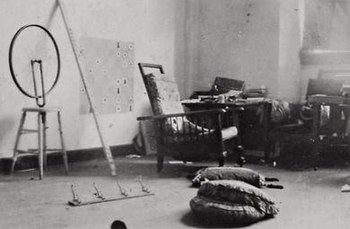
https://en.wikipedia.org/wiki/Bicycle_Wheel
In 1913 at his Paris studio he mounted the bicycle wheel upside down onto a stool, spinning it occasionally just to watch it. Later he denied that its creation was purposeful, though it has come to be known as the first of his readymades. "I enjoyed looking at it," he said. "Just as I enjoy looking at the flames dancing in the fireplace." It was not until he began making readymades a few years later in New York that he decided Bicycle Wheel was a readymade. There he realized the 2nd version.
https://en.wikipedia.org/wiki/Sophie_Taeuber-Arp
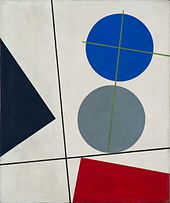
Sophie Taeuber-Arp was a key figure in many of the important movements of the pre-World War II art scene in Europe, and was one of the most active figures around the Cafe Voltaire in Zurich. She dedicated her career to breaking down static, artificial boundaries between genres and forms, and celebrating the creative energy such liberation released. Her creations attempted to destabilize traditional norms in art and society, and question fixed notions of gender, class, and nationality.
She made puppets that have inspired me for my Animation and these puppets and her art will influence the art direction my animation will take as i will use the same colour pallet as her.
Brain Storm:
Space Shooter Game
All characters are aliens
Cool looking ships
Many Weapons
Monkey Game
Fast paces platform
wall jump
sliding
like N+
Exploration game
like Tomb Raider
may things to collect
like Donkey Kong 64
Collectathon like Banjo Kazooie
Week 1:
Target Audience of Space Prisoner Game:
The target audience of this game would be of an older audience as it would deal with more adult themes such as imprisonment and revolt.
I think the games rating would be amount teen rating as it would contain violence but not to a horrifying degree such as in Grand Theft Auto games where violence is the main solution to mission and it also goes as afar as torture.
The rating will not be as high as other games as the violence is not realistic as the game is set in space which unreal weaponry like Lasers and Plasma which could result in very little gore/blood.
This is an example of a chart which displays much information about ierent aspects of an audience such as the Age, Gender and gaming frequency. If i were to create a chard like this it would come out much different as i think that more male players would be playing this game the the age rating would be lower as the game is more action oriented so i think younger people would be playing this game.
Game Industry Market Report:
There are 2,088 active games companies in the UK (listed in the map, as of January 2017)
Similar Games:
The game that would be most similar to my video game would be the game in the Star Fox Series, these games focus on battles in space using space ships.
My games rating will be rate PEGI 12 as there would be violence towards non human characters.
Another example of a rating like this is Shadow of the Colossus It contains: Realistic looking violence towards non human looking characters - Non realistic looking violence towards human characters
Intellectual Property:
Creating an intelectual property required payment to the government and gaining this IP requires you to then Protect your IP.
"A person commits an offence who with a view to gain for himself or another, or with intent to cause loss to another, and without the consent of the proprietor" This would cost the perpetrator £6,000 or a Prison Sentance Representation of Gender and Ethnicity Etc: In my game there will be no problems with ethnicity or gender as this game is set in space and all the characters are all aliens who hate each other equally.
Minimum Viable Product:
Animated scene containing self made models based on Space environments and a space battle
Animation would contain fly through capturing all of the planets created and ending in a space battle with one ship being destroyed with effects.
Space Environment would contain 1 Sun and 1 Planet, the flythrough would zoom in and capture the textures of the planet and the sun.
A rouge space ship aims near the planet when the other ship rises from the planet and shootys at the rouge space ship missing the first shot.
The rouge ship fires back grazing the other ship which then retaliated and delivers the fatal blow to the ship which blows the ship up This is where the clip ends.
Animations in video game have to be handeled carefully as animation can make or break a games immersion because if you see a game character doing something out of character or something silly it can take you out of the experience, an example of this is the game For Honor, its about medieval combat using unique mechanics and it draws you in with realistic armour but the emotes in the game can me used over and over created results that some players hate as it look ridiculous.
3D is used in many different industries for different effect. In the games industry 3D is used as a genre of game, from 3D platformers such as Super Mario 64 and Sonic Adventure, to 3D action games like Gotcha Force and Grand Theft Auto. Not all 3D games allow you to explore 3D environment, these games listed give the impression that you are in a massive open world that you can explore and that is the effect that they aimed to give. Although games such as Oddworld: Abe's Oddysee use the concept of 3D in a 2D game to give the effect that the game is more realistic. Using the Foreground to your advantage takes full advantage of the 3D presented in the game,
3D is not only used in the Games Industry however, another example of 3D being used is in the Films Industry, 3D CGI is used all the time to make mind blowing effects and to create characters that are near impossible to create using real props, an example of a 3D CGI film is Toy Story. Toy Story was created with only 3D graphics.
3D technology is also used in the Medical Industry, 3D CT scans are popular now as it gives a 3d image of somebodies inside that the doctors can use to examine and get ideas on how to help them.
3D Technology is also used in product design to create the product in software so they buyers have a basic idea on how the product looks before its built, this saves money and it helps as it can be edited with ease as its in software.
API
API stands for Application Programming Interface, API can be seen as a set of building blocks that programmers can put together the way they like to create software. Most Operating Systems provide an API for programmers to create things with. Since that programmers would use that API to create software, the "building blocks" are the same so that people who use those OS's would have an easier time learning that software.
Graphics Pipeline
The graphics pipeline refers to the steps taken to create 2D raster representation from a 3D Scene. This pipeline turns the mathematical 3D model into what we see that is displayed. The stages of the Graphics Pipeline consists of this.
3D Geometric Primitives: This is the first step, this step consists of making the scene out of triangles as its the most primitive geometric shape.
Modeling and Transformation: This step consists of transforming the local coordinate system to the 3D World coordinate system.
Camera Transformation: This step transforms the 3D world coordinate system to the 3D camera worl coordinate system with the camera as the origin.
Lighting: This is the step when the scene is illuminated and it calculates the various surfaces reflective properties.
Project Transformation: This step transforms the 3D world coordinates to the 2D view of the camera.
Clipping: Primitive Geometry not visible from the camera are discarded at this stage.
Scan conversion or Rasterization: This step is complex as each step from this point is used on every pixel on screen. This step consists of turning the 2D image space into a raster format.
Texturing, Fragment Shading: This step gives the various pixels colour based on values from rasterization.
Geometric theory is used in games to model characters and environment. An initial mesh is used to give a basic shape to an object that is later built upon with textures. the mesh consists of various 2D polygonal shapes, each polygon has Verticies, Edges and a face. In the creation of a polygon 2 verticies are connected together by a line creating the first edge. When another vertice is added a face is formed. This is a triangle but another vertice could be added to turn it into a quad. When creating character meshes tri's are used to create free flowing movement that looks smooth. Also when creating a mesh for a character all of the edges have to be connected do that the model can be composed entirely of 2D polygons.
When modelling there are various ways you can start, different modeling types are available such as Box, Edge and Extrusion.
Box modeling is a type of modeling in which you use extrusions and subdivisions to create various shapes with only using few shapes. The shapes split up into more faces and edges using a sub divide tool or edge loops, this gives much more freedom to the user by giving more faces, edges and vertices to move and extrude. Extrusions allow for the user to manipulate the shapes to their liking to create more complex shapes.
Extrusion modeling is also a way of modeling, this way of modelling is taking a single vert or using and edge and extruding it around an object. when the base object is traces using extrusions its the extruded along the Z axis to create a 3D object. This would be popular for symetrical things as it would be easy to create one half of it then mirror it.
Models can also be created from drawing/plans, an example of this is floor plans for houses, 3d models can be created to so how the house would look in a 3D environment, These would be created by created shapes over the walls to create the house. This can be used for other buildings as well, this type of modelling would save money as you would not need to create real life models which could cost a lot of money.
There are a lot of 3D Development software available. Different software is available for different uses, for example for 3D Modelling software is Blender, ZBrush and 3D-Coat.
These examples of software allow the user to create 3D models with various different modelling types, also they all offer a broad selection of tool that would be used in the modelling process. I have used blender to create assets, i have used a lot of the basic techniques and tools although there is still most of the software that i have yet to use, the base tools were enough for me to create basic assets and even experiment with more complex models.
Unity is another example of 3D Software that i have used, i have used this software to create various levels using plugins. I created the base levels using this software by creating blocks/cubes and extruding them to create walls and doors. I used the plugin Pro Builder to help extrude object to create more complex objects without importing assets as this would increase the file size immensely. Pro Builder gives you access to some primitive shapes such as cubes, stairs, spheres and more. this allows you to create more complex shapes using this software. Unity also allows you to explore your levels with the use of scripts. Characters are also available to allow you to move around your level to see it from that perspective.
ZBrush
"ZBrush is a digital sculpting and painting program that has revolutionized the 3D industry with its powerful features and intuitive workflows. Built within an elegant interface, ZBrush offers the world’s most advanced tools for today’s digital artists. With an arsenal of features that have been developed with usability in mind, ZBrush creates a user experience that feels incredibly natural while simultaneously inspiring the artist within. With the ability to sculpt up to a billion polygons, ZBrush allows you to create limited only by your imagination."
"MAXON Computer is a leading developer of 3D software for the creative industries, best known for Its flagship 3D modeling, painting, rendering, and animation software, Cinema 4D. Today, thousands of users across the world rely on Cinema 4D to create cutting-edge 3D motion graphics, architectural and product visualizations, video game graphics, illustrations, and much more. MAXON's client list includes ABC, Blizzard Entertainment, BMW, BSkyB, CNN, Fox, ITV Creative, MPC (Moving Picture Company), NBC, NFL Network, Rhythm & Hues, Siemens VDO, Sony Pictures Imageworks, The Walt Disney Company, Turner Broadcasting, Vitra, and many more."
Within 3D software there are some constraints that can set behind a project badly. An example of this is the Polygon count, each model consists of many polygons which makes up each model. when the computer is calculating the position of each individual polygon the more there are to calculate the harder it is on the processor and the longer it would take to calculate each polygon, when models are created it would be for the best that there are as little polygons as possible to reduce the time it takes for the processor to complete that task. This constraint would be aimed at video games as the processor would have to render the games graphics each time it is player, in movies each polygon is pre-rendered so this does not affect movies.
File Size limits have always been a constriction in video games, some games have been top big to fit on their game cartridges/disks, for example Final Fantasy 7 was put on 4 disks for the Playstation 1 as it was a massive game. Graphic wise, console games don't look as good as games on PC due to the fact that PC's can be built to be much more powerful then a console so that allows better graphics to be rendered/displayed at once.
Render time is an issue/constraint due to how varied the process is, if the model that is created is small the render time would be very short. Although when large levels/models are created the render time can range from minutes to days depending on the polygon count. Companies that create games sometimes have computers dedicated to rendering to cut down the time considerably. Not only does rendering apply to 3D in modelling or animations or larger animated films, but it contributes to mobile phones, virtual worlds and a wide range of multimedia. It is known to be present in video games as the console and game itself would need to be allowed time to load certain scenes, thus rendering out the scenes to make them available to the players in “real time” to enhance the game play, making it all the more important.
3D is used in many different industries for different effect. In the games industry 3D is used as a genre of game, from 3D platformers such as Super Mario 64 and Sonic Adventure, to 3D action games like Gotcha Force and Grand Theft Auto. Not all 3D games allow you to explore 3D environment, these games listed give the impression that you are in a massive open world that you can explore and that is the effect that they aimed to give. Although games such as Oddworld: Abe's Oddysee use the concept of 3D in a 2D game to give the effect that the game is more realistic. Using the Foreground to your advantage takes full advantage of the 3D presented in the game,
3D is not only used in the Games Industry however, another example of 3D being used is in the Films Industry, 3D CGI is used all the time to make mind blowing effects and to create characters that are near impossible to create using real props, an example of a 3D CGI film is Toy Story. Toy Story was created with only 3D graphics.
3D technology is also used in the Medical Industry, 3D CT scans are popular now as it gives a 3d image of somebodies inside that the doctors can use to examine and get ideas on how to help them.
3D Technology is also used in product design to create the product in software so they buyers have a basic idea on how the product looks before its built, this saves money and it helps as it can be edited with ease as its in software.
API stands for Application Programming Interface, API can be seen as a set of building blocks that programmers can put together the way they like to create software. Most Operating Systems provide an API for programmers to create things with. Since that programmers would use that API to create software, the "building blocks" are the same so that people who use those OS's would have an easier time learning that software.
Graphics Pipeline
The graphics pipeline refers to the steps taken to create 2D raster representation from a 3D Scene. This pipeline turns the mathematical 3D model into what we see that is displayed. The stages of the Graphics Pipeline consists of this.
3D Geometric Primitives: This is the first step, this step consists of making the scene out of triangles as its the most primitive geometric shape.
Modeling and Transformation: This step consists of transforming the local coordinate system to the 3D World coordinate system.
Camera Transformation: This step transforms the 3D world coordinate system to the 3D camera worl coordinate system with the camera as the origin.
Lighting: This is the step when the scene is illuminated and it calculates the various surfaces reflective properties.
Project Transformation: This step transforms the 3D world coordinates to the 2D view of the camera.
Clipping: Primitive Geometry not visible from the camera are discarded at this stage.
Scan conversion or Rasterization: This step is complex as each step from this point is used on every pixel on screen. This step consists of turning the 2D image space into a raster format.
Texturing, Fragment Shading: This step gives the various pixels colour based on values from rasterization.
Geometric theory is used in games to model characters and environment. An initial mesh is used to give a basic shape to an object that is later built upon with textures. the mesh consists of various 2D polygonal shapes, each polygon has Verticies, Edges and a face. In the creation of a polygon 2 verticies are connected together by a line creating the first edge. When another vertice is added a face is formed. This is a triangle but another vertice could be added to turn it into a quad. When creating character meshes tri's are used to create free flowing movement that looks smooth. Also when creating a mesh for a character all of the edges have to be connected do that the model can be composed entirely of 2D polygons.
Withing these models the user is able to use rigging to further enhance the models, this adds bones which the user can manipulate to create better animations.